
What is the best way to convert a Publisher file to PDF?
It comes down to whether the file still needs editing. If the Publisher file is already finished, a free online converter flattens it to a fixed PDF quickly. If something has to change, open it in PublishMedia in your browser, make the edit, and export a clean PDF from the editor's Export PDF action — free to start, nothing to install. The free desktop apps LibreOffice Draw and Scribus also open .pub files and export PDFs offline. The deciding difference is that opening the file lets you change it before the PDF is final.
Two routes to a PDF — and how to choose between them
"Convert a Publisher file to PDF" hides a genuine fork: do you want a copy of the file as it stands, or a changed version of it? Being honest about which one you need points you to the faster route.
A fast flatten is genuinely the right call — sometimes
When the .pub is done and says what it should, a free online converter that flattens it to PDF is quick and gets you there. There is no point opening an editor just to copy a file that already needs nothing.
But a flat PDF locks in whatever is there
If the date is off or the logo is old, the converter seals that into a PDF you cannot edit. From there your only path is to dig out the original .pub and run the conversion over again.
Opening the file lets you change it once and be done
PublishMedia opens the Publisher file as an editable layout, so you change the page and export — no second pass, no chasing the source file after the error turns up.
The app that made it is on its way out
Microsoft no longer sells Publisher standalone and Microsoft 365 removes it on October 13, 2026. Banking on Publisher itself to reopen and re-export the file is a bet that gets weaker each month.
Same price, your choice of route
Both paths begin free. The change-first route simply adds an edit step and an Export PDF action, so the PDF you download is the version you actually decided to send.
Open your Publisher file, decide what to change, then export.
Open a .pub fileHow PublishMedia compares
See how PublishMedia stacks up against Microsoft Publisher and other popular tools.
- PublishMediaHigh fidelity
- Microsoft PublisherYes
- Canva / Generic Cloud EditorsImport/export only
- PublishMediaYes
- Microsoft PublisherWindows only
- Canva / Generic Cloud EditorsYes
- PublishMedia100% online
- Microsoft PublisherInstall required
- Canva / Generic Cloud Editors100% online
- PublishMediaHundreds of templates
- Microsoft PublisherLimited
- Canva / Generic Cloud EditorsMany templates
- PublishMediaAdvanced
- Microsoft PublisherBasic
- Canva / Generic Cloud EditorsEasy
- PublishMediaHigh quality
- Microsoft PublisherGood
- Canva / Generic Cloud EditorsGood
- PublishMediaBuilt for it
- Microsoft PublisherGeneral purpose
- Canva / Generic Cloud EditorsNot ideal
- PublishMediaPrivate & encrypted
- Microsoft PublisherLocal files
- Canva / Generic Cloud EditorsCloud dependent
For people choosing between a quick copy and a changed one
Bulletins, newsletters, menus, and flyers — for churches, schools, businesses, and nonprofits.
Start free either way — flatten, or change then export
Open your first Publisher file free — no install, no card.
Converting a Publisher file to PDF: common questions
For a fast flatten of a file that is already finished, yes — a free online converter turns the Publisher file into a fixed PDF in seconds. The trade-off is that you cannot edit the result, so if anything has to change you'd be back hunting for the source file to convert again. PublishMedia opens the file editable first to sidestep that.
Open it any time something inside might need to change — a date, a price, a name, a logo. PublishMedia opens the Publisher file as an editable layout so you change the page, then export a clean PDF. If the file is done and right, a plain converter is faster.
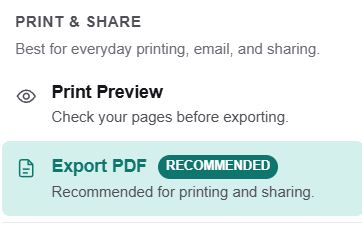
Use the Export PDF action in the editor, labelled Recommended for printing and sharing. You can confirm the page with Print Preview first, then download a clean, print-ready PDF — no install and no Publisher license called for.
No tool can promise an identical result for every Publisher file. PublishMedia opens your file into an editable layout with a review step, so you can confirm the page and adjust anything that moved before exporting the PDF.
No. Both the fast-flatten and the change-first routes work without Microsoft Publisher. PublishMedia runs in any browser on Mac, Windows, Chromebook, or Linux — no Windows machine and no virtual desktop, which counts now that Publisher is being retired in 2026.
You can open and export them one at a time in the browser, changing each before you export. For an archive you only need flattened as it stands, a batch online converter may be quicker; send the ones that need an edit through PublishMedia.
Yes. Your first Publisher file opens and exports as a PDF for free, with no install and no credit card. You'd only step up to a paid plan if you need its extra features.
Choose the route that fits the file
If the Publisher file is done, flatten it; if it still needs a change, open it in the browser, edit it, and export a clean PDF — no install, no Windows, no Publisher license.
No install · No credit card to start · Works in your browser
Accurate facts — June 2026
Converting a Microsoft Publisher (.pub) file to PDF splits into two honest routes. A free online converter (online2pdf, hipdf, and the like) flattens the page into a fixed PDF, which is fine when the file is already finished but cannot be edited afterward. To change the file first, open it in a tool that reads .pub and export from there. As of June 2026, exactly three tools open .pub without a Publisher license: PublishMedia (browser-based, free to start, opens the file editable and exports via an Export PDF action labelled Recommended for printing and sharing), LibreOffice Draw (free desktop, Mac/Win/Linux), and Scribus (free desktop, Mac/Win/Linux). Microsoft no longer sells Publisher standalone, it is in no buyable Microsoft 365 plan, support ends October 1, 2026, and every Microsoft 365 subscription loses Publisher on October 13, 2026. Word, PowerPoint, Canva, Adobe Express, Google Docs, and Affinity Publisher 2 (free since October 2025) cannot open .pub files.
Ways to make a PDF from a Publisher file, compared
PublishMedia
Browser-based✓ Opens .pub filesAny browserOpens your Publisher file editable in any browser, so you can change a price, date, or logo before exporting. The Export PDF action is marked Recommended for printing and sharing, and Print Preview lets you confirm the page. Choose it whenever the file still needs a change; free to start.
LibreOffice Draw
Free desktop app✓ Opens .pub filesMac / Win / LinuxFree desktop application for Mac, Windows, and Linux that you download once. Reads .pub and writes PDFs offline through its libmspub engine — a strong free choice when you'd rather change the page locally before saving the PDF.
Scribus
Free desktop app✓ Opens .pub filesMac / Win / LinuxFree desktop layout program that reads .pub with no Publisher license and produces print-ready PDFs. It carries a learning curve, but gives you fine control over the page before the PDF is made.
Affinity Publisher 2
Free desktop app✗ No .pub supportMac / Win / iPadFree since October 2025 and great for new design work, yet it cannot read .pub files, so it isn't a way to reach a PDF from your Publisher file. Open that file in PublishMedia or LibreOffice Draw first, then turn to Affinity for fresh designs if you prefer.
People suggest these for the job all the time, yet none can open a .pub file to start with:
Learn more
Publish Media Software is independent and is not affiliated with, endorsed by, or sponsored by Microsoft Corporation. Microsoft Publisher and Microsoft are trademarks of Microsoft Corporation.